

For bookkeepers, shops and finance teams
Every receipt read and checked
Upload a stack of receipts or invoices in English or Bangla. Crosscheck turns them into clean spreadsheet rows andchecks every total. You only fix the few that need it.
Sign up with email or Google. Sample receipts and invoices included.
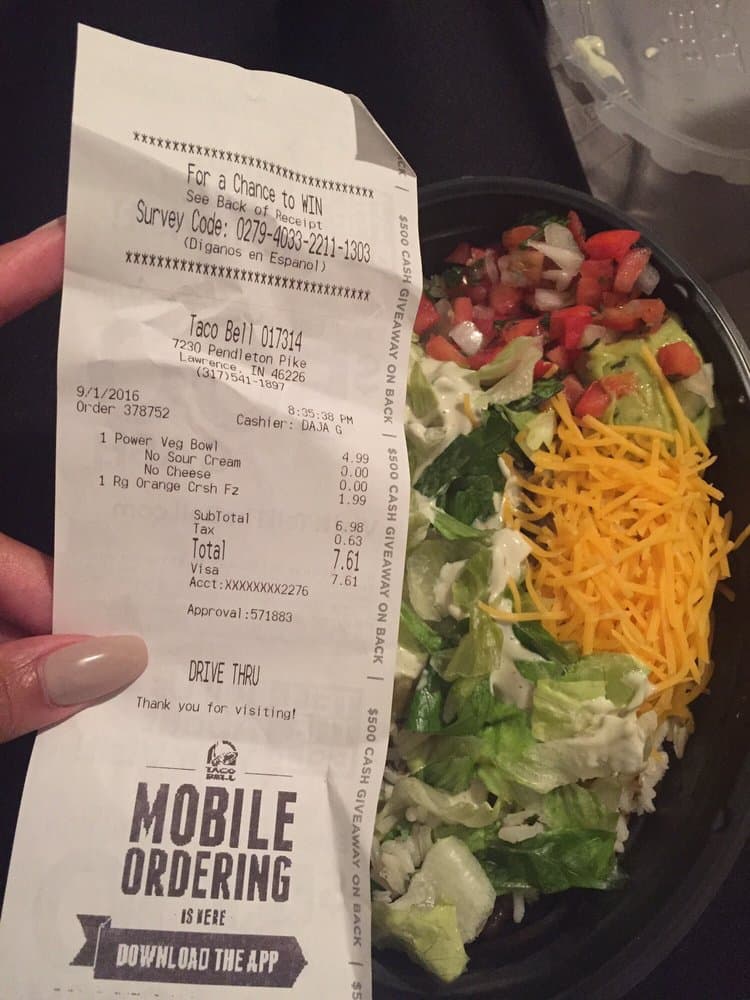
TACO BELL 017314
Power Veg Bowl4.99
No Sour Cream0.00
No Cheese0.00
Rg Orange Crsh1.99
= Subtotal6.98✓
+ Tax0.63
= Total7.61✓
CurrencyUSD✓
Date 9/1/2016?
Could be 1 Sep or 9 Jan. Sent to review.
For the bills that come in
Your till knows what you sell. But the bills you receive still get typed in by hand.
Bookkeepers
Upload a client's month of paperwork at once. You only check the ones that don't add up.
Receipts · invoices
Restaurants and shops
Every supplier bill looks different. They all end up in one spreadsheet.
Produce · meat · repairs
Expense claims
Staff photograph their receipts. You check the flagged ones and export the rest.
Fuel · taxi · supplies
Year-end and audits
Clear a backlog 20 at a time. Duplicates are caught before they count twice.
Last year's receipts
Fix mistakes in one click
When a total doesn't add up, Crosscheck shows the wrong line and suggests the fix. Check it against the photo and apply it in one click.
What it catches
- Weighed items like meat and produce
- A wrong digit in a price or total
- Dates that could mean two different days
- A second opinion from another AI model on anything flagged
Nothing in your data changes until you click Apply.
Ask about your documents
Ask in English or Bangla, the way you would ask your bookkeeper. The assistant finds the answer in your documents and explains every flag. It can read your data but never changes it.
- How much did I spend last month?
- Which bills are due this week?
- Why is this receipt flagged?
From a pile of receipts to a clean spreadsheet
Upload in batches
Drop up to 20 photos or PDFs at once. Most are ready in about five seconds.
English and Bangla
Works with receipts, invoices and handwritten memos in either language.
Review only what needs it
Receipts that pass every check go straight to your export. You only open the ones that need a look.
Find any document
Search by supplier and filter by status. The dashboard shows what you spent, the tax you paid and your top suppliers.
Export anywhere
Download a CSV or Excel file for your accountant, or a file QuickBooks imports as bills.
Send to your tools
Add each document to Google Sheets, or get an email or Telegram alert when one needs review.
Every document is checked
Anything that fails a check waits in your review list.
Line items match the subtotal
Line discounts included
Totals add up
Subtotal, tax, service charge and discount
Each line adds up
Quantity times price equals the amount
Tax matches the rate on the bill
VAT, GST or sales tax, and printed discounts
Tax numbers are valid
Catches mistyped GSTIN and UK VAT numbers
Dates make sense
A date like 05/11 is sent to you to confirm
Nothing is missing
Total, items and currency are all there
No duplicates
The same bill uploaded twice is caught
One bill per photo
Two receipts in one photo are flagged
When a check fails, a second AI model reads the document again and shows where the two readings disagree.
Privacy
Only you see your files
Other users can't see your documents.
Delete anytime
Remove one document or your whole account.
Read by Google Gemini
This demo uses Gemini's free plan. Google may use files to improve its AI. Please upload samples.
Try it with a sample receipt or invoice
Sign up free. Sample receipts and invoices are ready to try.